Bellagio
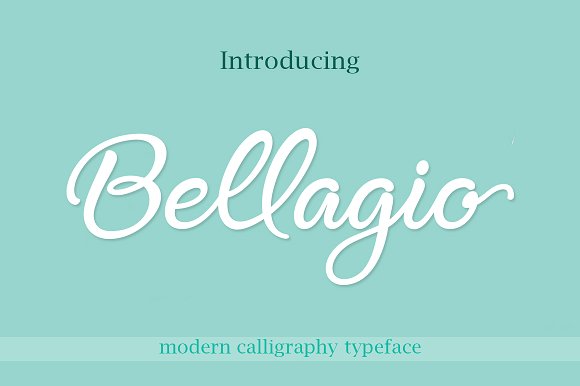
If you have ever searched for a handwritten script font that feels both elegant and contemporary, Bellagio likely caught your attention. Created by Byuly Ayika, this modern handwritten script font offers a range of OpenType features and alternate characters that set it apart from simpler script fonts. Yet many people download or purchase fonts like Bellagio without fully understanding what they are getting—or how to use it effectively. The result can be wasted time, poor design outcomes, or even licensing headaches. This article walks through common pitfalls when choosing and using Bellagio, and shows you how to get the most out of this versatile typeface.
Mistake 1: Assuming Bellagio Works Like Any Other Script Font
Many designers and business owners treat script fonts as interchangeable. They pick one that looks pretty and drop it into their project, only to find that the letters don’t connect properly, the spacing feels off, or the overall look lacks polish. Bellagio is not a basic script. It includes numerous OpenType features such as ligatures, stylistic sets, and contextual alternates. Without leveraging these, you are essentially using a stripped-down version of the font. The results can look disjointed—like handwriting that doesn’t flow.
What to do instead: Before using Bellagio, open it in a font management tool or design software that supports OpenType features (like Adobe Illustrator, Affinity Designer, or even Canva’s advanced text panel). Explore the alternate characters and ligatures. Test how the letters connect when you type common word pairs. For example, the “th” combination often has a special ligature that makes it appear more natural. Using these features elevates your design from amateur to professional instantly.
Mistake 2: Overlooking Alternate Characters and Swashes
Bellagio includes a rich set of alternate characters—swashes, flourishes, and variant letterforms. A frequent oversight is using the default characters only. This leads to a predictable, repetitive look. For instance, the capital “B” or “L” might come with a standard form and a more decorative swash version. If you use the standard every time, you miss the chance to add personality to your headings or logos.
Better approach: When working on a project like a wedding invitation, a boutique logo, or a social media header, deliberately choose alternates for key letters. In design software, you can access these via the glyphs panel or by enabling stylistic sets. For Bellagio, check which sets contain the variations you want. For example, Stylistic Set 1 might replace standard capitals with flourished versions. Experiment with several alternates and see which combination creates the most balanced visual flow. This small step can turn a generic script into a custom lettering piece.
Mistake 3: Ignoring Readability in Longer Text
Bellagio is undeniably beautiful, but it is a script font designed primarily for display purposes. A common mistake is using it for body text—such as paragraphs on a website, long product descriptions, or email newsletters. While it might look charming in small doses, in blocks of text it becomes difficult to read, especially at smaller sizes. Readers may tire quickly, and important information gets lost.
How to avoid this: Reserve Bellagio for headlines, subheadings, quotes, or short decorative elements. For body copy, pair it with a clean sans-serif or serif font that complements its style. For instance, a simple geometric sans like Raleway or a neutral serif like Lora maintains readability while letting Bellagio shine where it matters. This approach respects the font’s character and your audience’s comfort. It also shows that you understand typography hierarchy—a quality that builds trust with your viewers.
Mistake 4: Downloading from Unreliable Sources
Bellagio is a premium font created by an independent designer. Because of its popularity, you may find it offered on dubious websites for free or at a deep discount. Downloading fonts from untrusted sources carries risks: corrupted files, missing OpenType features, malware, or invalid licenses. Many users end up with a version that lacks the very alternates and ligatures that make Bellagio special. Others face legal issues if they use a pirated copy for commercial work.
What to check before downloading: Always purchase Bellagio from the designer’s official store or a reputable marketplace like MyFonts, Creative Market, or Fontspring. Verify that the license covers your intended use (personal, commercial, or both). If you are a small business owner or freelancer, a commercial license is essential. The cost is modest compared to the legal and reputational damage of using an unlicensed font. Also check that the font file includes OpenType features—some budget versions may strip them out. Investing in a legitimate, full-featured copy ensures you get exactly what Byuly Ayika designed.
Mistake 5: Not Testing Across Different Mediums
A font that looks perfect on your screen may not behave the same way when printed, displayed on a mobile device, or embedded in a website. Bellagio, with its delicate strokes and swashes, can become too thin or lose detail at small sizes or on low-resolution screens. Many people design a logo in Bellagio, only to find that it bleeds or becomes illegible on a business card or a mobile browser.
Practical advice: Always test Bellagio in the final medium before committing. For print, do a physical test at actual size. For web, use a tool like Google Fonts testing or your browser’s developer tools to preview at various screen sizes and resolutions. Consider creating a fallback font stack for web use. And if you’re designing a logo, ask your printer for a proof. If Bellagio’s thin strokes are problematic, you might choose a bolder weight or adjust the size and spacing. Taking these steps prevents unpleasant surprises and saves rework.
Mistake 6: Forgetting to Pair with a Complementary Font
Script fonts often look best when they are not the only typeface in a design. Some people use Bellagio alone for everything, leading to a cluttered or overwrought look. Others pair it with another script or decorative font, causing visual conflict. The key is balance. Bellagio’s handwritten, flowing nature calls for a contrast that is clean and simple.
How to choose a partner: Look for a font that is neutral and offers good contrast in weight, style, or width. A light sans-serif works well for subtitles and body text. For example, Open Sans, Lato, or Montserrat are safe choices. If you prefer a serif, try something like Cormorant Garamond for a more elegant pairing. Avoid using two script fonts together—they compete for attention. A good rule of thumb: one decorative, one utilitarian. Test the pair at actual sizes, and check that they share similar x-heights or proportions for harmony.
Mistake 7: Overusing Special Characters and Ligatures
Alternate characters and ligatures are powerful, but more is not always better. A common trap is enabling all stylistic sets and using every swash possible within a single word or line. The result can look chaotic and forced. For instance, a logo where every capital has an extreme flourish and each letter connects with an elaborate ligature may become illegible or gaudy.
Better approach: Use alternates sparingly and with purpose. Decide on one or two letters to emphasize—perhaps the first letter of each word in a headline. Keep the rest in their standard, more legible form. For Bellagio, swash capitals can draw the eye, but they lose their impact if overused. Also, be mindful of spacing: some alternates may extend beyond the usual letter boundaries, so adjust kerning manually if needed. This restraint shows sophistication and ensures your design remains readable and professional.
Mistake 8: Neglecting to Check Licensing for Web Use
Many people download a font for a print project and later decide to use it on their website, unaware that web use often requires a separate license. Bellagio is no exception. Using a desktop license for a webfont is a violation of the font’s terms and can lead to takedown notices or legal action. Even if you embed it via a service like @font-face, you need the right permissions.
What you should verify: When purchasing Bellagio, look specifically for a “Webfont License” option. Some marketplaces offer a bundle that includes desktop, web, and app licenses. If you only have a desktop license, do not use it on your website. Instead, either buy the webfont package or use a service like Fonts.com or Typekit that hosts the font legally. For small business owners and bloggers, this is a critical step—many are surprised when their site gets flagged. Keep records of your purchase and license details. It’s a simple precaution that protects your work and respects the designer’s craft.
Mistake 9: Ignoring the Design Context
Bellagio is a modern handwritten script with a romantic, elegant feel. That makes it ideal for invitations, greeting cards, feminine branding, and luxury products. But it is not suitable for every project. Using it for a corporate annual report, a technical blog, or a fitness brand can send the wrong message—or simply look out of place. Context matters.
How to decide: Before reaching for Bellagio, ask yourself: What is the tone I want to convey? Who is my audience? If the brand is playful, artistic, or personal, Bellagio can be a strong choice. If it needs to appear authoritative, technical, or minimalist, look elsewhere. For example, a wedding planner’s website benefits from Bellagio’s warmth; a cybersecurity firm does not. By matching the font’s personality to your brand’s identity, you avoid looking out of touch and create a cohesive visual language that resonates with your target audience.
Mistake 10: Skipping Manual Kerning Adjustments
Even with OpenType features, no font automatically gets spacing perfect for every combination of letters. Bellagio, like most script fonts, can have awkward gaps or collisions between certain letter pairs. Relying solely on the default kerning is a mistake that can make your text look sloppy, especially in larger sizes like headlines or logos.
Fix it: After setting your text in Bellagio, always review the spacing pair by pair. In design software, manually adjust kerning for problematic pairs. Common offenders in script fonts include “Yo,” “Wa,” or “To.” Zoom in and shift letters until the flow looks natural. Also check the overall tracking (letter spacing) if you want a tighter or more airy feel. A few minutes of manual cleanup makes a significant difference in quality. Professionals know that great typography is often in the details, and this step separates polished work from amateur layouts.
Final Thoughts on Using Bellagio Effectively
Bellagio is a well-crafted font that can elevate your projects when used with intention. By understanding its OpenType features, respecting its limitations, and pairing it wisely, you avoid the common mistakes that frustrate many users. Whether you are a small business owner designing your own logo, a blogger creating custom headers, or a freelance designer working on a client’s brand, taking the time to learn how Bellagio works will reward you with professional results. Start by exploring the font’s alternates, test it in your real medium, and always secure a proper license. With these practices, you will not only avoid poor decisions but also make Bellagio a valuable tool in your creative toolkit.