Watermelon Script: The Juicy, Bouncy Calligraphy Font That Adds Life to Any Design
Imagine you are crafting a wedding invitation, designing a social media post, or labeling a handmade product. You want the text to feel personal, joyful, and unmistakably handcrafted. That is exactly where Watermelon Script enters the scene. This juicy, bouncy calligraphy font has captured the imagination of designers, crafters, and business owners alike, offering a lively alternative to stiff, uniform typefaces. By blending the spontaneity of brush lettering with digital precision, Watermelon Script brings a sense of warmth and authenticity to projects across industries. Whether you are a seasoned graphic designer or a hobbyist exploring creative hobbies, understanding what makes this font special can elevate your work and help you communicate with personality.
The Allure of Bouncy Calligraphy
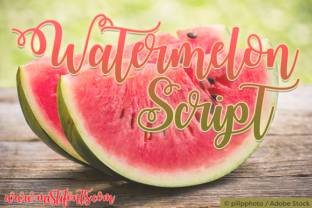
Bouncy calligraphy is not just a trend—it is a return to expressive, human-centered typography. Unlike traditional script fonts that maintain a rigid baseline and uniform letter heights, bouncy calligraphy deliberately varies the position, size, and rhythm of each character. Letters may dance above or below the line, some lean more dramatically, and others flaunt exaggerated loops. This irregularity mimics the natural pressure and speed of a hand holding a brush or dip pen. Watermelon Script captures this spirit perfectly. Each character feels alive, as if it were written with a steady yet playful hand, with juicy strokes that taper elegantly and thick downstrokes that demand attention. For creative projects that need to stand out, this style injects a dose of personality that no sterile font can achieve.
What Makes Watermelon Script Unique
At its core, Watermelon Script is a bouncy calligraphy font designed to evoke the freshness and vibrancy of its namesake. Its letterforms feature generous curves, rounded terminals, and a natural bounce that varies from letter to letter. The font includes multiple stylistic alternates for many characters, allowing you to customize the bounce and avoid repetition. For example, the lowercase a and g may appear in several forms—some with open bowls, others with closed loops—giving you control over the overall texture. Additionally, contextual ligatures automatically adjust spacing for pairs like ff, ll, or tt, ensuring a seamless, flowing appearance. These details matter because they transform a simple word into a visual experience. When you type “Hello” in Watermelon Script, the varying baselines and subtle swashes create a greeting that feels handwritten and warm.
Real-World Applications for Every Audience
The versatility of Watermelon Script makes it valuable for a broad range of users. From professionals to hobbyists, each group can harness its unique energy in different ways.
For Creators and Crafters
If you work in DIY crafts, scrapbooking, or home decor, Watermelon Script is a dream. Its bouncy nature adds a handmade touch to vinyl decals, stencils, and iron-on transfers. Use it for custom coffee mugs, signage for a craft market booth, or a child’s birthday banner. Because the font includes both uppercase and lowercase glyphs with multiple alternates, you can create a “never-repeating” look for longer phrases. When paired with a simple sans-serif font for secondary text, Watermelon Script becomes the focal point that draws the eye. Many crafters also appreciate the font’s support for extensive language characters, allowing projects in Spanish, French, German, and more without losing the script aesthetic. In software like Cricut Design Space or Silhouette Studio, Watermelon Script cuts beautifully on vinyl or paper because the strokes are thick enough to hold together while retaining delicate details.
For Small Business Owners and Marketers
Business owners looking to establish a friendly, approachable brand will find Watermelon Script a powerful tool. It works exceptionally well for logos, product packaging, and social media graphics in niches like bakeries, florists, children’s stores, and handmade goods. The font’s bouncy, organic feel communicates creativity, care, and approachability. For example, a bakery might use Watermelon Script on cake boxes or Instagram posts to caption “freshly baked” with a sense of indulgence. However, due to its playful nature, it is best used as a display font for headlines or short phrases rather than body text. Business owners should also consider pairing it with a clean, neutral font—like a geometric sans-serif—for legibility in menus or contact information. Watermelon Script’s ability to evoke emotion can help small brands stand out in a crowded market without relying on generic stock fonts.
For Educators and Students
In educational settings, Watermelon Script can serve both practical and inspirational roles. Teachers introducing calligraphy or typography to students might use the font to demonstrate concepts like stroke variation, ascender height, and rhythm. Since the font includes OpenType features accessible in most design software, students can experiment with alternates and ligatures to see how small changes affect overall readability and mood. Additionally, educators creating classroom materials—such as bulletin boards, worksheets, or name tags—can use Watermelon Script to add a friendly, visually engaging element. The font’s legibility at medium sizes makes it suitable for short titles and headers. For art projects, students can print phrases using Watermelon Script and then hand-trace them to practice lettering, bridging digital and analog skills.
Technical Tips for Getting the Most Out of Watermelon Script
To fully leverage Watermelon Script, it helps to understand a few technical aspects. The font is typically available in OpenType (OTF) and TrueType (TTF) formats, which work across Windows, macOS, and most design platforms. When using it in Adobe Illustrator or Photoshop, open the Glyphs panel to access alternate characters and ligatures. Many versions of Watermelon Script also include swash endings that can be activated selectively. For example, you might apply a swash to the first or last letter of a word to create a more ornate appearance. In web design, the font can be embedded using @font-face with proper licensing, but its intricate strokes may require higher resolution screens to display cleanly—consider using it for headings and large text rather than body copy.
Pairing and Sizing Strategies
Watermelon Script shines when paired thoughtfully. Because the script is bold and expressive, it demands space. Use it at sizes above 24 points in print, and even larger on screen. For a harmonious layout, pair it with a minimal sans-serif like Montserrat, Raleway, or Open Sans. The contrast between the fluid, bouncy script and the crisp, geometric sans creates visual tension that guides the viewer’s eye. You can also pair it with a serif font for a more traditional, elegant feel—particularly for wedding invitations or formal correspondence. A good rule is to limit Watermelon Script to one line or a few words per design; overusing a bouncy font can fatigue the reader. In multi-line headings, consider decreasing tracking (letter spacing) slightly to prevent gaps created by the bouncing ascenders and descenders.
File Formats and Licensing Considerations
Before using Watermelon Script commercially, verify the license. Most premium versions grant broad usage for personal and commercial projects, but some restrictions may apply for app embedding or large-volume merchandise. If you are a designer purchasing for a client, check whether the license covers the specific deliverables. Free alternatives exist, but they often lack the refined alternates and kerning that make Watermelon Script a reliable choice. Always download from a reputable foundry or distributor to avoid malware and ensure font integrity. For print production, embedding the font in PDFs is straightforward; for web, use a webfont kit or self-host the files to avoid performance issues.
Why Bouncy Fonts Are Here to Stay
The rise of digital communication has paradoxically increased our desire for authenticity. People crave the imperfect, human feel of hand-lettered type. Bouncy calligraphy fonts like Watermelon Script fill that niche by offering digital convenience with analog charm. They are especially popular in the wedding industry, lifestyle blogging, and e-commerce branding, where personalization is key. As social media continues to prioritize visual storytelling, the ability to convey emotion through type becomes more valuable. Watermelon Script doesn’t just complement an image; it becomes part of the narrative. Whether used to announce a promotion, celebrate a milestone, or simply add a creative flourish to a project, this font bridges the gap between the sterile pixel and the handwritten note.
Looking Ahead: Trends in Handcrafted Typography
Expect to see more designers embracing bouncy scripts as part of a broader shift toward maximalism and expressive design. Watermelon Script fits into the trend of “joyful design” that emerged post-pandemic, where visuals prioritize warmth, humor, and connection. Alongside variable fonts and textured typefaces, bouncy calligraphy offers flexibility that can adapt to both retro and modern aesthetics. Its juicy strokes and playful bounce can evoke nostalgia for handwritten correspondence while remaining fresh in digital interfaces. For creators who want to stay current, adding Watermelon Script to their typography toolkit is a simple yet impactful move. The font also pairs well with abstract backgrounds, gradients, and layered illustrations, opening up creative possibilities that extend beyond plain text.
Integrating Watermelon Script into Your Daily Workflow
You don’t need to be a professional designer to use Watermelon Script effectively. Many online platforms like Canva, Adobe Express, and Cricut Design Space support custom fonts, allowing anyone to drag and drop phrases into templates. Start by downloading the font and installing it on your computer. Then, choose a project—perhaps a birthday card or a store sign—and type out a short message. Use the Glyphs panel or font menu to swap alternates if your software allows. Experiment with different sizes, colors, and paper textures. Print a test to see how the bounce translates from screen to physical form. For digital use, avoid dark backgrounds with thin strokes; the font’s bold features stand out best on light or mid-tone surfaces.
Common Mistakes to Avoid
Even a beautiful font can fall flat if misused. One common mistake with Watermelon Script is setting it to all caps for long sentences—uppercase glyphs are designed to be used sparingly. Overusing swashes and alternates can make a word look erratic rather than charming. Another pitfall is ignoring spacing; because the font bounces, default kerning may need manual adjustment for certain letter pairs like Ti or Vo. Always proofread your layout and adjust letter spacing or use ligatures to improve readability. Finally, resist the urge to combine Watermelon Script with another script font—they will conflict. Stick to one script as the hero and contrast it with a neutral typeface.
Final Reflections on Watermelon Script’s Place in Design
Typography is a silent communicator. The font you choose says as much about your message as the words themselves. Watermelon Script speaks with a voice that is upbeat, generous, and unmistakably human. Its bouncy calligraphy style invites the viewer to lean in, smile, and feel the care embedded in every curve. Whether you are designing a logo that needs to win over customers, a classroom poster that engages students, or a personal project that expresses your creativity, Watermelon Script delivers a distinct, memorable impression. As digital tools continue to evolve, the beauty of handcrafted fonts reminds us that design is not just about communication—it is about connection. And few fonts make that connection as naturally as this juicy, bouncy calligraphy font.