Lorano: A Geometric Sans Serif for Modern Design Workflows
Choosing the right typeface is a decision that ripples through every stage of a project, long after the initial concept is approved. Whether you're building a mobile app interface, crafting a magazine spread, or developing a brand identity, the font you select affects readability, user perception, and production efficiency. Lorano, a contemporary sans serif from Hederae Type Foundry, offers a practical solution for designers who need a typeface that combines geometric precision with real-world usability. This article walks through what Lorano is, where it fits in a design workflow, and how to integrate it into your projects with minimal friction.
Understanding Lorano's Design Foundations
Lorano is a geometric sans serif built on principles drawn from rationalist and minimalist movements. Its letterforms are not decorative or expressive in the traditional sense — they are deliberate, clean, and structurally consistent. This makes the typeface a natural fit for projects where clarity and order matter more than ornamentation.
The design features several specific characteristics worth noting. The geometries are pure, with round right angles measured at 1.40pt, giving corners a soft but precise finish. The medium-large x-height improves legibility at small sizes, which is critical for user interfaces and mobile screens. Slightly wider horizontal proportions add breathing room between characters, making text feel open and airy without sacrificing density. These traits are not arbitrary; they are engineering decisions that affect how the font performs in different contexts.
When you evaluate a typeface for a project, you are essentially assessing how its built-in constraints align with your functional requirements. Lorano's design leans toward clarity, neutrality, and readability across a range of sizes and media. It does not compete for attention — it supports the content.
Where Lorano Fits in a Design Workflow
Integrating a typeface into a project involves more than downloading files and setting a font-family rule. The decision affects planning, execution, and long-term maintenance. Here is how Lorano fits into different phases of a typical workflow.
Before the Project: Planning and Preparation
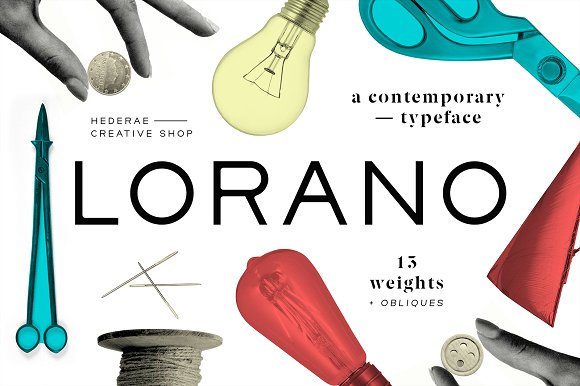
During the planning phase, you define the visual language of a project. This is the time to evaluate whether a typeface can handle the range of use cases you anticipate. Lorano's family includes 13 weights, from Thin to ExtraBlack, plus corresponding obliques, giving you 26 fonts total. This range covers everything from light body text to heavy display headlines without requiring a second typeface.
Consider your production environment. Lorano is available in OTF, TTF, EOT, WOFF, and WOFF2 formats, which means it works across web, desktop, and mobile platforms. If you are planning a responsive web project, the WOFF2 format ensures efficient loading without sacrificing quality. If you are preparing print assets, the OTF files give you full OpenType features. Planning for these format requirements early avoids last-minute conversions or compatibility headaches.
Language support is another factor to assess during preparation. Lorano covers Albanian, Catalan, Croatian, Czech, Danish, Dutch, Esperanto, Estonian, Filipino, Finnish, West Frisian, French, Hungarian, Irish, Italian, Latvian, Lithuanian, Norwegian, Polish, Portuguese, Romanian, Serbian, Slovenian, Spanish, Swedish, Turkish, Welsh, English, and German. If your project targets audiences in these languages, you will not need to patch in glyphs from another font — a significant time saver for multinational interfaces or publications.
During the Project: Implementation and Iteration
Once you move into active production, Lorano's consistent stroke weights and geometric proportions reduce decision fatigue. When you use multiple weights in a single interface — for example, Light for body text, Medium for subheadings, and Bold for primary actions — the relationship between sizes remains visually coherent. There is no sudden shift in character width or color that forces you to adjust spacing on a per-weight basis.
For UI and mobile app work, the medium-large x-height is particularly useful. Text renders at higher readability in small viewports, and the slightly wider horizontal proportions prevent characters from crowding together. You can set body text at a comfortable size without worrying about letter collision or reduced legibility on low-resolution screens.
When laying out logotypes or short branding elements, Lorano's geometric purity becomes an asset. You can space the letters wide for a sophisticated, editorial feel, or keep them tight for a modern, compact mark. The obliques provide a genuine italic that works for accent text without visual inconsistency. Testing different weight combinations during the iterative phase is straightforward because the family is modular — each weight behaves predictably relative to the others.
In collaborative environments, sharing Lorano across a team is simplified by the available formats. Developers can use the WOFF and WOFF2 files directly in CSS, while designers work with OTF or TTF in Sketch, Figma, or Adobe products. This eliminates the need for format conversion or explanation of which file to use where.
After the Project: Production, Maintenance, and Scaling
After launch, consistency becomes the primary concern. Lorano's uniform design language means that any new page, feature, or asset created weeks or months later will match the original implementation. There is no risk of drift if a different team member picks up the project later — the typeface's constraints keep outputs aligned.
For web projects, using the web font formats (WOFF and WOFF2) with proper subsetting reduces page weight. If you are serving content in only a few of the supported languages, you can generate subsets that exclude unused glyphs, improving load times without compromising visual quality. This is a practical maintenance step that many teams overlook until performance issues arise.
For print publications or brand materials, Lorano's wide range of weights and obliques means you can extend a single identity across business cards, brochures, signage, and digital ads without needing to license a secondary font. This reduces long-term licensing costs and simplifies asset management.
Practical Use Cases Across Projects
Not every project demands the same approach. Based on Lorano's characteristics, here are specific scenarios where the typeface performs well:
- User interfaces and mobile apps: The medium-large x-height and wider proportions make microcopy and navigation labels readable. Thin weights work for secondary information; ExtraBlack adds hierarchy to buttons or headers.
- Logotypes and branding marks: The geometric construction provides a neutral base that can be customized through spacing or color. The oblique variant adds directionality without breaking the visual system.
- Short editorial text and magazines: Lorano holds up well at display sizes for headlines and pull quotes. The slight rounding of corners prevents the typeface from feeling cold or overly mechanical, which is useful for lifestyle or culture publications.
- Corporate communications and internal tools: A single family that covers body text, headings, and data labels reduces file bloat and keeps reports visually consistent across departments.
- Responsive web design: Because Lorano works across all standard web font formats and maintains readability from very small to very large sizes, it adapts well to varying viewports without requiring separate font stacks for different breakpoints.
Working with the Lorano Family: Formats and Technical Integration
Understanding the technical side of font integration helps you avoid common pitfalls. Here is what you need to know about Lorano's file structure and implementation:
- Weights and obliques: 13 weights (Thin, ExtraLight, Light, Regular, Medium, SemiBold, Bold, ExtraBold, Black, ExtraBlack) plus obliques for each, totaling 26 fonts. Use obliques as true italics; they are not simply slanted versions of the upright forms.
- File formats: OTF and TTF for desktop use (design software, system installation, print production). EOT, WOFF, and WOFF2 for web use. Prioritize WOFF2 for modern browsers due to better compression.
- Language coverage: 30 languages supported. If your audience includes speakers of Central or Eastern European languages, you can rely on Lorano without supplementing glyphs from another typeface.
- CSS implementation: Use
@font-facerules referencing the WOFF2 and WOFF files. Includefont-display: swapto ensure text remains visible during font loading. List fallback fonts such as Arial or Helvetica to preserve geometric proportions if the custom font fails to load.
Long-Term Quality Control and Consistency
One of the underappreciated aspects of typeface selection is how it affects quality control over time. When a family offers consistent metrics across all weights, you can automate spacing rules, set vertical rhythm, and define scale ratios with confidence. Lorano's uniform design means that the relationship between, say, Regular and Bold remains predictable whether you are using them in a mobile app or a printed brochure.
For teams that maintain design systems or component libraries, this consistency reduces the cognitive load of adjusting kerning or line-height for each new component. Once you define your type scale using Lorano, it applies uniformly across all weights and obliques, saving time during audits or redesigns.
Additionally, because Lorano is available in both static files and web font formats, you can enforce a single source of truth across your design tools and codebase. Designers work from the same OTF files that power the final output, reducing discrepancy between mockups and production.
Integrating Lorano into Your Own Work Routine
Adopting a new typeface does not have to disrupt your existing process. Start by testing Lorano in a single project — perhaps a landing page, a presentation deck, or a simple app interface. Use two or three weights to get a feel for how the family handles hierarchy and spacing. Compare it against your current go-to typeface in a side-by-side layout to see if the geometric proportions and x-height improve readability at the sizes you actually use.
If you manage multiple projects, create a shared repository of the Lorano font files in OTF, TTF, and WOFF/WOFF2 formats so that every team member accesses the same version. Include a short style guide that documents recommended weights for body text, headings, and UI elements. This removes ambiguity and ensures that the typeface is applied consistently from day one.
For long-term use, pay attention to how Lorano performs in context. Notice whether the slightly wider proportions save users from misreading characters in small interface labels. Track whether the oblique variant is used more for emphasis than for decorative effect. These observations will inform how you refine your typographic rules over time.
Lorano is not a novelty font. It is a production tool designed for teams and individuals who need a reliable, geometric sans serif that works across platforms, languages, and media. When you treat it as part of your workflow rather than as a stylistic choice, you get the most out of its practical strengths.