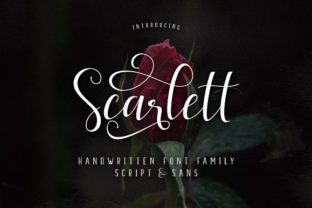
Scarlett: A Font Family That Blends Script and Sans Serif for Real-World Design
If you’ve ever found yourself piecing together fonts from different families, hoping they’d play nicely together, you know the frustration. One feels too formal. The other too casual. They clash in weight, rhythm, or personality. That’s where Scarlett steps in — not as another standalone typeface, but as a complete family of 11 individual fonts designed to work together from the start. It brings five Script fonts and six Sans Serif fonts into a single cohesive system. The result? A toolkit that lets you move fluidly between playful and polished, decorative and direct, without ever leaving the family.
What makes Scarlett especially useful is how naturally the Script and Sans Serif styles complement each other. Instead of forcing a pairing, they feel like they belong together. The Script fonts bring movement, warmth, and personality — think wedding invitations, social media headlines, or product packaging that needs a human touch. The Sans Serif fonts offer clarity, structure, and readability — perfect for body text, navigation, or any place where legibility matters most. Together, they allow you to create layered, nuanced designs using a single source.
And because the Script fonts come packed with extra swashes and swooshes, you’re not limited to a single look. You can stretch a letter here, add a flourish there, or let a tail loop beneath a word for emphasis. It gives your text a handmade feel without requiring you to draw anything yourself.
Why the Script and Sans Serif Mix Matters in Everyday Projects
The real value of Scarlett shows up in the flow of real work. Imagine you’re building a brand identity for a small coffee shop. The logo needs to feel warm and inviting — that’s where a Script font shines. Maybe you use one of the five Script styles for the shop name, adding a swoosh beneath it for character. Then, for the menu boards, takeout bags, and website copy, you switch to a Sans Serif from the same family. The connection between the two is immediate. Customers see the logo and the menu text and instinctively feel they belong to the same brand. No guesswork. No hunting for a complementary font.
Or consider a social media manager juggling multiple platforms. On Instagram, you want captions that feel personal and visually engaging — a Script font with a swash can turn a simple quote into something shareable. On LinkedIn or a company blog, the same message needs to feel professional and scannable. The Sans Serif fonts in Scarlett handle that shift effortlessly. You’re not reinventing your visual identity every time you switch platforms. You’re just choosing the right weight or style from the same family.
Event invitations are another natural fit. Whether it’s a birthday party, a gallery opening, or a casual get-together, pairing a Script headline with Sans Serif details (date, location, RSVP info) creates a polished look without feeling overdone. The extra swashes give you room to personalize — maybe a flourished initial or a decorative underline — without cluttering the design.
Different Users, Different Ways to Benefit
Scarlett isn’t designed for one type of user. It adapts to the task at hand. Here are a few scenarios where it really earns its place:
Freelance designers and creative agencies
If you work with multiple clients across different industries, you need flexibility. One client might be a boutique skincare line — soft, elegant, feminine. Another could be a tech startup — clean, modern, direct. Having both Script and Sans Serif in one family means you can shift tone without starting from scratch. The Script styles can lean romantic or playful depending on which variant you choose, while the Sans Serif fonts offer enough weight and spacing options to handle body copy, headlines, and captions. For agency work, where speed and consistency matter, that’s a practical win.
Small business owners and entrepreneurs
When you’re running a business, you don’t have time to learn typography. You need tools that work out of the box. Scarlett lets you create professional-looking materials — flyers, price lists, social posts, even signage — without hiring a designer. The Script fonts add personality to your brand name or tagline. The Sans Serif fonts handle the practical stuff. And because they’re from the same family, everything looks intentional. The extra swashes mean you can add a decorative touch to a thank-you card or a limited-time offer without needing illustration skills.
Content creators and influencers
Your visual identity is part of your content. A consistent font pairing across YouTube thumbnails, Instagram stories, and website headers helps people recognize your work instantly. Scarlett gives you that consistency while letting you vary your tone. Use a Script font for a heartfelt story or a product reveal. Use Sans Serif for tutorials, lists, or anything where clarity matters. The swooshes and swashes also work well for highlights, dividers, or stylized callouts — small details that make your content feel more produced.
Event planners and wedding coordinators
Typography is a subtle but powerful part of event design. Scarlett works well for save-the-dates, programs, place cards, and signage. The Script fonts bring the romance; the Sans Serif fonts handle the logistics. You can use a Swash variant for the couple’s names and a clean Sans Serif for the schedule or menu. The result is cohesive without being repetitive. And because the family includes multiple weights, you can create hierarchy — bold for headings, light for details — while keeping the visual thread intact.
Practical Examples That Show How Scarlett Works
Let’s walk through a few concrete setups to see how the family behaves in practice.
Branding a local bakery: The logo uses a Script font with a swoosh under the name. Business cards pair that same Script for the business name with a Sans Serif for contact info and address. The website follows the same logic — hero headlines in Script, product descriptions in Sans Serif. Packaging uses the Script for product names and Sans Serif for ingredient lists or baking instructions. The consistency builds trust, and the customer starts associating that specific Script + Sans Serif combination with the bakery itself.
Designing a digital magazine spread: The title of the article uses a Script font with a swash on the first letter. Subheadings and pull quotes shift to a bold Sans Serif. Body text uses a light or regular Sans Serif for readability. The swashes act as visual anchors, drawing the eye to key moments without needing images or illustrations. It keeps the layout clean while giving it personality.
Creating a product launch email: The product name appears in Script with a swoosh trailing beneath it. A brief description below uses Sans Serif. The call-to-action button text uses a bold Sans Serif for emphasis. The extra swashes add a celebratory feel without making the email feel cluttered. Across a series of emails — teaser, launch, follow-up — the family remains consistent, reinforcing the brand.
What to Consider Before Using Scarlett
No font family is a perfect fit for every situation, and Scarlett has its own strengths and limitations worth noting.
Strengths: The biggest advantage is the built-in harmony between Script and Sans Serif. You don’t need to spend time pairing fonts from different families — they already match. The extra swashes and swooshes give you creative options without requiring custom illustration work. And with 11 fonts in two styles, you have enough variety to handle most projects without feeling limited.
Limitations: The Script fonts, like most scripts, work best at larger sizes. Using them for body text or small captions can hurt readability. Stick to headlines, logos, short phrases, or decorative elements. The Sans Serif fonts handle body text well, but if your project needs a very narrow or compressed sans serif, you might want to supplement with a separate utility font. Also, because the family includes decorative swashes, it’s easy to overuse them. A little goes a long way — using swashes on every letter or in every headline can make the design feel busy rather than refined.
Technical considerations: Make sure your design software supports OpenType features if you want full access to the swashes and alternates. Most modern tools — Adobe Creative Suite, Figma, Canva, Affinity — handle this well. If you’re working in a simpler tool, you may need to copy and paste specific glyphs rather than using contextual alternates automatically. It’s a small extra step, but worth knowing ahead of time.
Audience and context: Scarlett’s style leans warm and approachable. It works beautifully for lifestyle brands, creative industries, events, and personal projects. If your brand requires a very corporate, cold, or ultra-minimalist look, the Script fonts might feel out of place. In those cases, you could still use the Sans Serif fonts alone, but you wouldn’t be taking full advantage of the family’s strengths.
Where Scarlett Fits in the Bigger Picture
Typography choices often come down to a trade-off between personality and practicality. You want text that looks good and works hard. Scarlett tries to avoid that trade-off by giving you both in one package. The Script fonts bring the personality — the curves, the flourishes, the warmth. The Sans Serif fonts bring the practicality — the clarity, the structure, the readability. Together, they cover a wide range of use cases without forcing you to compromise.
For anyone who regularly creates content — whether you’re a designer, a business owner, a marketer, or a creator — having a single family that handles both decorative and functional roles simplifies your workflow. You spend less time pairing fonts and more time focusing on the message itself. The extra swashes and swooshes are a bonus, not a requirement. You can use them heavily in one project and barely at all in another, and the family still works.
Scarlett isn’t trying to be every font. It’s trying to be the right font for the moments when you need warmth and clarity to coexist. And in practice, that turns out to be a surprisingly common need.