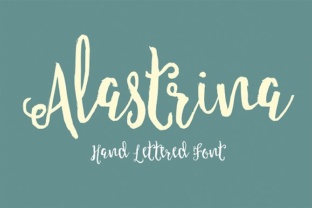
Alastrina: A Handwritten Font That Bridges Authenticity and Workflow Efficiency
When you are building a brand, designing a presentation, or laying out content for social media, the typography you choose does more than convey words. It sets a tone. Among the many typefaces available, handwritten fonts occupy a unique space: they bring warmth, personality, and human touch. But not all handwritten fonts work well in practical, day-to-day workflows. Some are too decorative to read at small sizes. Others lack the glyph support needed for professional projects. Alastrina, created by Area Type, is designed to solve that tension. It is a handwritten font that feels personal without sacrificing legibility, and it fits naturally into workflows where authenticity and consistency both matter.
This article walks through what Alastrina is, where it belongs in your process, and how to integrate it into real projects—whether you are a designer, marketer, educator, or entrepreneur.
What Alastrina Offers and Where It Belongs
Alastrina is a handwritten font from Area Type, a foundry known for producing typefaces that balance character with utility. Unlike many script fonts that lean heavily toward calligraphy or brush strokes, Alastrina has a clean, contemporary hand-lettered feel. The letterforms are deliberate but not rigid. They carry a natural rhythm that mimics genuine handwriting, which makes them approachable for audiences who respond better to human-centric design than to mechanical type.
In practical terms, Alastrina sits somewhere between a display script and a readable text face. It works well for headlines, pull quotes, invitations, social media graphics, product packaging, and branding elements where you want personality to lead. It can also function in shorter body passages when scaled appropriately, though it is not designed for long-form reading at small sizes. That distinction matters when you plan a project: use Alastrina where the human touch adds value, not where clarity under dense text is required.
Where Alastrina Fits in the Creative Workflow
Every project follows a sequence of decisions. Typography choices appear early, influence layout, and affect how audiences perceive the final output. Alastrina can enter your workflow at multiple points depending on your role and goals.
Before the Project: Planning Typography Strategy
If you are planning a brand identity or a content campaign, you likely start with mood boards, style tiles, or typographic hierarchies. Alastrina can serve as the anchor for a warm, approachable visual voice. During this pre-production phase, you evaluate how it pairs with other typefaces. Because Alastrina has a natural, slightly uneven baseline (as most handwritten fonts do), it pairs best with clean sans-serif or neutral serif typefaces for body text. For example, using Alastrina for headings alongside a geometric sans like Montserrat or a humanist sans like Source Sans creates contrast without conflict. Document your pairing choices early so you maintain consistency across deliverables.
During Production: Applying Alastrina to Assets
When you move into actual design work, Alastrina integrates directly into your usual tools. Whether you use Adobe Illustrator, Photoshop, Canva, Figma, InDesign, or Affinity, the font loads as a standard OTF or TTF file. You adjust tracking, line height, and scale just like any other typeface. However, handwritten fonts require a bit more attention to spacing. Alastrina comes with well-tuned default kerning, but you should still review letter pairs and adjust manually when the font is used in large headlines. This is a normal part of working with any script face. The time you spend refining spacing during production prevents a messy look in the final output.
If you are creating social media templates, video titles, or presentation slides, consider layering Alastrina with a subtle shadow or a light texture to emphasize its hand-drawn quality. That works especially well when the asset appears on screen, where viewers expect visual texture.
After Delivery: Maintaining Consistency Across Channels
Once the project is live, the font continues to play a role in brand consistency. Save Alastrina as part of your brand asset library. If you work in a team, share the font file and a short usage guide that specifies where Alastrina should appear (headlines only, not body copy) and what size range works best. This prevents misuse in future materials. Many teams also include Alastrina in their brand style guide, noting the recommended pairings and spacing adjustments. Doing so ensures that the authenticity you built into the original project carries forward.
Practical Use Cases Across Different Roles
Alastrina is not limited to one type of professional. Its flexibility makes it useful across several common scenarios.
For Marketers and Small Business Owners
If you manage brand content for a small business, you need visuals that stand out without requiring a design team. Alastrina works well for social media quote cards, email headers, product labels, and promotional banners. It gives the brand a personal feel that resonates with customers who value authenticity. When used consistently across Instagram, Facebook, and your website, it becomes a recognizable element of your visual identity.
For Freelancers and Creatives
As a freelancer, your portfolio and client materials reflect your personal style. Alastrina can appear in your logo, business cards, presentation decks, and project mockups. It helps you communicate a creative, human-centered approach before a potential client even reads your work samples. Pair it with a clean sans-serif for your body text to keep the overall look professional.
For Educators and Bloggers
Course materials, worksheets, and blog graphics benefit from typography that feels inviting. Alastrina works well for section headers, callout boxes, and instructional headings. It signals that the content is approachable. In a digital course or a branded PDF, using Alastrina sparingly—only for titles and key highlights—keeps the document readable while adding warmth.
For Event Planners and Invitation Designers
Handwritten fonts are a natural fit for wedding invitations, save-the-date cards, event programs, and place cards. Alastrina offers the elegance of hand lettering without the ornate flourishes that can make other script fonts hard to read. It works on both digital invites and printed materials. If you are printing, test the font at your intended size early to ensure ink coverage and legibility on your chosen paper stock.
Integrating Alastrina with Other Tools and Assets
Typography never exists in isolation. Alastrina interacts with your broader toolkit in several ways.
- Design software: Alastrina loads as a standard font in all major design tools. No special plugin or configuration is needed. Just install the font and select it from the type menu.
- Brand asset management: If you use a platform like Brandfolder, Frontify, or a simple cloud folder, store Alastrina alongside your logos, color palettes, and templates. This makes it easy for collaborators to access the correct version.
- Website integration: For web use, you will need to use Alastrina via a web font service or self-host it using @font-face. Be mindful of file size and load speed, especially if you use it for headings on multiple pages. Testing on mobile ensures that the handwritten style renders clearly on smaller screens.
- Print production: Alastrina works in both digital and offset printing. If you produce invitations, signage, or packaging, request a proof before full production to confirm that the font's fine details hold up at your chosen size.
Implementation Tips for Consistent Quality
Getting the most out of Alastrina requires attention to a few practical details. These are not complicated, but they make a difference between a polished result and one that feels off.
- Set minimum and maximum size guidelines. Alastrina works best between 18pt and 72pt for most uses. Below that, the handwritten details may become hard to read. Above that, you may see uneven stroke weights that are natural in script fonts. Adjust based on your specific design.
- Adjust line height for readability. Handwritten fonts benefit from a little extra vertical space. When Alastrina appears in multi-line headings or short paragraphs, increase line height to 1.4 or 1.5. This prevents letters from clashing and keeps the text inviting.
- Pair with a neutral body font. Choose a sans-serif or serif that contrasts clearly with Alastrina. Avoid pairing it with another script or decorative font—that creates visual noise. A clean, neutral partner lets Alastrina carry the personality.
- Treat color and background with care. Alastrina works beautifully on light backgrounds with a contrasting color. Dark backgrounds with light text also work, but avoid overly busy or textured backgrounds that compete with the letterforms.
- Create templates early. If Alastrina will appear across multiple deliverables (social posts, email banners, print materials), design reusable templates. This saves time in later projects and enforces consistency. A simple Canva or Figma template with fixed font sizes and colors keeps everyone aligned.
Long-Term Use and Asset Management
Once Alastrina becomes part of your workflow, you want to keep it usable over time. Store the font file in a location that survives computer upgrades. If you license the font for commercial use, keep track of your license details and any usage restrictions. Area Type provides standard desktop and web font licenses, so check which one fits your projects.
Also, review your usage of Alastrina periodically. As your brand evolves, the role of any single typeface can shift. You may find that Alastrina works best for a specific product line or a particular season of content. That is fine. The key is to use it intentionally, not by habit. When you revisit your style guide or template library, ask whether Alastrina still serves the tone you want to project. If the answer is yes, keep it front and center. If your visual direction has changed, consider adjusting how heavily you rely on it.
Finally, share your experience with teammates or collaborators. A short written note about where Alastrina performs best and where it should be avoided prevents misuse. For instance, if someone tries to use Alastrina in a dense paragraph at 12pt, they will likely find it hard to read. A simple guideline saves them the trial and error and keeps the brand looking consistent across all touch points.
Alastrina by Area Type is more than a decorative option. It is a practical tool for anyone who needs a handwritten font that works within real project constraints. When you plan around its strengths, pair it thoughtfully, and document your usage, it becomes a reliable part of your visual toolkit. Whether you are designing a brand identity, building a content library, or creating a one-off invitation, Alastrina delivers the authenticity your audience responds to—without making your workflow harder.