Claudette Script Font: Elegant Swashes for Modern Creatives
Typography shapes how people perceive your work before they read a single word. A well-chosen typeface can whisper professionalism, shout creativity, or invite warmth. For designers, small business owners, and content creators who want a handwritten look that feels polished rather than casual, Claudette offers a compelling solution. This modern script font brings two weights—Regular and Bold—along with a generous set of swashes that open up countless layout possibilities. Whether you are designing a wedding invitation, building a brand identity, or sprucing up a social media post, understanding what Claudette offers and how to use it effectively can elevate your projects from good to memorable.
What Makes Claudette Stand Out as a Script Font
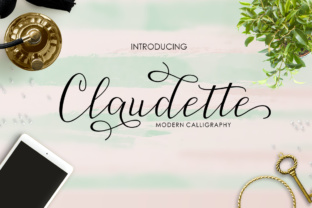
Claudette sits in the sweet spot between decorative and functional. Many script fonts lean heavily into flourishes that look beautiful but become illegible at small sizes. Others strip away personality in favor of readability. Claudette manages to balance both needs. Its letterforms flow naturally, with the connected strokes you expect from a quality script, yet each character remains distinct enough to read without squinting.
The font comes in two weights: Regular and Bold. This might sound limited compared to typefaces with dozens of variations, but for a script font, two well-crafted weights cover most practical needs. The Regular weight works beautifully for body text in invitations, quotes, or product descriptions. The Bold weight adds impact for headings, logos, or any place you want the text to command attention. Because both weights share the same underlying design DNA, mixing them in a single project feels cohesive rather than jarring.
What truly sets Claudette apart, however, is its swash collection. Swashes are decorative extensions attached to letters—think elegant loops, sweeping tails, or ornate caps. Claudette packs many of these into the font, giving you creative flexibility without needing separate software or manual drawing. You can turn a simple word into a visual statement simply by choosing a swash variant of a letter. This feature alone makes the font attractive for anyone who wants that hand-lettered, artisanal look without spending hours drawing each curve.
Who Benefits Most from Claudette
The versatility of Claudette means it suits a broad range of users, but certain groups will find it especially valuable.
Small Business Owners and Entrepreneurs
If you run a boutique, a café, a wedding planning service, or any business that relies on aesthetic appeal, your visual identity matters. Claudette helps you create logos, signage, menu headers, and promotional materials that feel personal and crafted. You do not need to hire a professional lettering artist—the font itself delivers that handcrafted charm. The swashes let you customize wordmarks so your brand does not look like everyone else using a generic script font.
Bloggers and Content Creators
A blog or social media feed needs visual consistency to build recognition. Claudette works well for pull quotes, post titles, watermark overlays, and email header graphics. Because it remains readable even at moderate sizes, you can use it for short paragraphs in your about page or call-to-action sections. The Regular weight keeps things subtle, while the Bold weight adds emphasis where it matters.
Wedding and Event Professionals
Save-the-date cards, invitation suites, place cards, thank-you notes, and signage all benefit from a script font that feels romantic yet readable. Claudette’s swashes give you the ornate touches couples often want, while the two weights let you differentiate between the main event name (Bold) and supporting details like date and location (Regular). The font handles well in both digital files and printed pieces, so you can design once and use across multiple formats.
Educators and Hobbyists
You do not have to be a professional designer to enjoy Claudette. Teachers creating classroom decorations, homeschool parents designing worksheets, or hobbyists making scrapbook pages will find the font easy to work with. The swashes add that extra sparkle without complicating the layout. Because the font includes both Regular and Bold, you can teach students about typographic hierarchy using a single typeface.
Practical Ways to Use Claudette in Real Projects
Understanding where a font shines is one thing; knowing how to apply it effectively is another. Let me walk through a few realistic scenarios that show Claudette in action.
Branding a Small Bakery
Imagine you are helping a friend launch a home bakery called “Sweet Mornings.” You want the logo to feel warm, handmade, and slightly nostalgic. Claudette Bold for the name gives you thick, confident strokes that work well on a storefront sign or packaging sticker. For the tagline—“Baked with love daily”—you switch to Claudette Regular, which keeps the script feel but does not compete with the main name. A swash on the capital S or M adds a decorative flourish that makes the logo feel custom. The same font pair can extend to business cards, cake labels, and social media banners, ensuring consistency across every touchpoint.
Designing a Personal Brand for a Freelancer
Freelancers often juggle multiple roles and need a visual identity that reflects their personality without screaming “template.” If you are a freelance copywriter or photographer, you might use Claudette Regular for your website’s hero heading and the Bold weight for your portfolio titles. The swashes allow you to add a signature-style flourish to your name in your email signature or watermark. Because the font is available as a standard digital file, you can install it on your computer, use it in Canva, Adobe applications, or even simple tools like Pages or Word, depending on your comfort level.
Creating Invitations for a Milestone Event
A 50th birthday party or an anniversary celebration calls for something more special than a standard invitation font. With Claudette, you can set the primary event name in Bold with a swash on the first letter, then use Regular for the date, time, and location. The contrast between the two weights creates a natural hierarchy that guides the reader’s eye. You can even use a swash variant on just one letter per line to keep the design elegant without going overboard.
Important Considerations Before Using Claudette
No font is perfect for every situation, and Claudette has a few characteristics worth keeping in mind before you commit to it.
Readability at very small sizes. Like most script fonts, Claudette can become difficult to read if you set it below 12 points, especially the Bold weight. For body copy in print materials, consider using the Regular weight at a generous size. For digital applications, stick to headings and short phrases rather than paragraphs. If you need large blocks of text, pair Claudette with a clean sans-serif font like Open Sans or Lato for the supporting copy.
Swashes require thoughtful use. The abundance of swashes is a feature, but it can become a pitfall if you overdo it. Using swashes on every capital letter in a single word can make the text feel chaotic and hard to read. A good rule of thumb is to apply swashes sparingly—one or two letters per word or line. This preserves the decorative effect without overwhelming the viewer. Experiment with different swash combinations to see what looks balanced.
Licensing and compatibility. Before using Claudette in commercial projects, check the license terms. Some fonts restrict usage in certain products like logos, merchandise, or digital templates. Make sure you have the appropriate license for your specific use case. Also verify that the font works with your design software. Most modern formats (OTF, TTF) are widely supported, but older applications might not handle advanced swash features correctly.
Pairing with other fonts. Claudette has a distinct personality, so it pairs best with neutral, understated typefaces. A simple sans-serif or a clean serif will complement the script without competing. Avoid pairing Claudette with another elaborate script font, as the result can look busy and unprofessional. When in doubt, test a few combinations before settling on a final design.
Getting Started with Claudette
If you are new to working with script fonts or swashes, Claudette is a friendly place to start. Install the font on your computer, open your design tool of choice, and experiment with typing a single word. Try cycling through different swash variants by using the font’s alternate character menu (often found in the Glyphs panel in Adobe software or the Character options in Canva). See how a simple change like swapping a standard capital letter for a swash version transforms the whole look.
Start with a personal project—a monogram, a greeting card, or a quote for your social media profile. This low-stakes practice helps you understand how the font behaves, how the weights differ, and how much swash is too much. Once you feel comfortable, move on to client work or professional materials.
Claudette is more than just another script font. With two practical weights and a wealth of swashes, it gives you the tools to create work that feels custom, elegant, and approachable. Whether you are building a brand, celebrating a milestone, or simply adding a handcrafted touch to your next project, this typeface deserves a spot in your creative toolkit. Take the time to explore its possibilities, and you will likely find yourself reaching for it again and again.