Girlboss Script: A Bold, Hand-Drawn Font for Purposeful Design Work
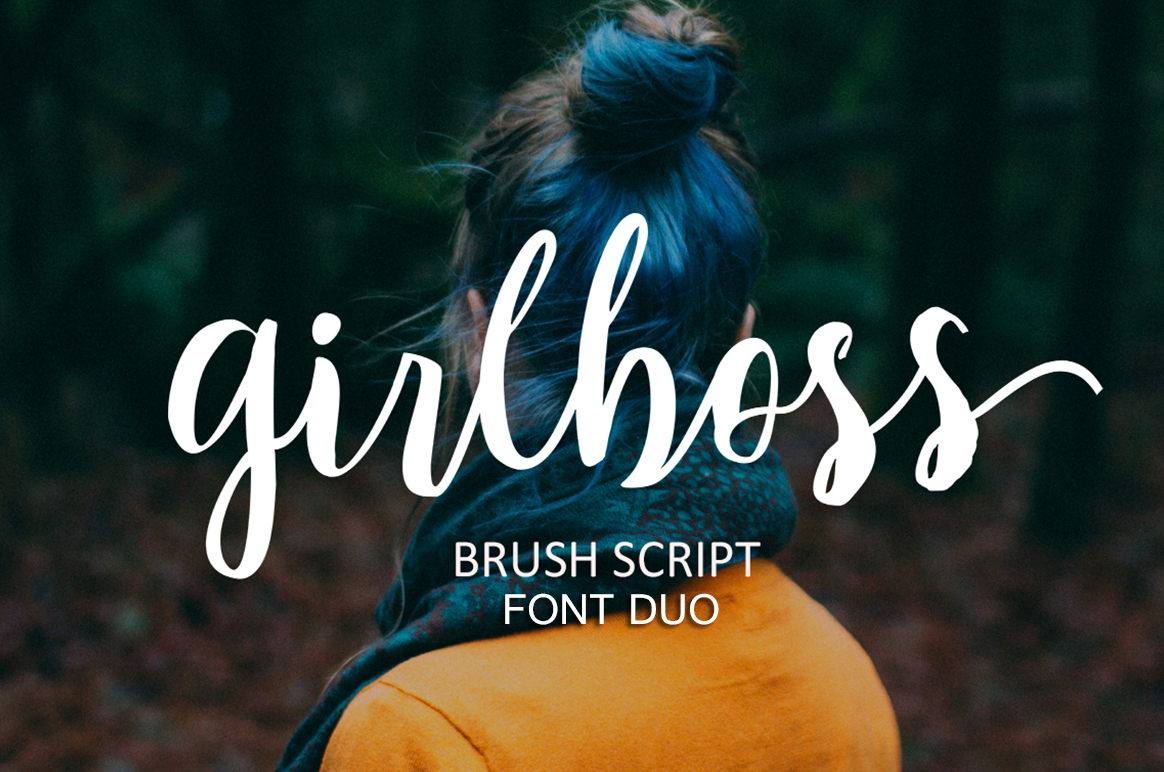
Choosing the right typeface is often a decision between tone and function. You might have a clear message, but if the letterforms don't carry that message with the right energy, the impact falls flat. Girlboss Script is a modern hand-drawn brush font that bridges that gap. It carries a dynamic, energetic style that feels both feminine and authoritative. If you are building a brand, designing a campaign, or preparing content that needs to project confidence without losing approachability, this typeface deserves a close look.
This article walks through what Girlboss Script offers, how it fits into real creative and business workflows, and how you can integrate it into your projects with practical, repeatable strategies. The focus is on usage, not hype.
What Girlboss Script Brings to Your Type Library
Girlboss Script is not a neutral font. Every stroke carries intentional movement. The brush texture gives it a tactile, human quality, while the consistent weight and structure keep it readable. This combination makes it suitable for both digital and print contexts where you need a distinct voice.
At its core, this font works well when you want to achieve the following outcomes:
- Establish a confident brand voice – The letterforms feel assertive but not aggressive. They work for hero headlines, logos, and taglines.
- Add personality to otherwise standard layouts – When your design uses clean sans-serif or serif body text, a script like this creates contrast and visual hierarchy.
- Communicate energy and motion – The hand-drawn quality makes static designs feel more alive. This is useful for social media graphics, event materials, and product packaging.
- Maintain readability at scale – Unlike some brush scripts that become illegible at smaller sizes, Girlboss Script retains clarity when sized appropriately. That makes it practical for subheadings and short callouts.
Understanding these strengths helps you decide when to use it and when to set it aside in favor of a more restrained typeface.
Where Girlboss Script Fits in a Design Workflow
Every project follows a loose arc: planning, execution, review, and delivery. Girlboss Script can play a role at multiple points along that arc, but it is most effective when used deliberately rather than as a default.
During the Planning and Concept Phase
Before you open your design software, consider how you want your audience to feel. If the answer involves words like bold, confident, modern, or feminine, then Girlboss Script can serve as a directional anchor for your visual direction. During mood boarding or style tile creation, pull a few sample words set in this font. Compare them against other script and display typefaces. Notice how the brush texture interacts with your color palette and imagery. This early test saves time later, because you avoid forcing a font into a layout that does not suit its personality.
During Asset Creation and Layout
Once you move into execution, Girlboss Script works best as a hero element. Use it for primary headlines, pull quotes, and section dividers. It pairs naturally with clean, neutral body fonts such as Open Sans, Lato, or Montserrat. The contrast between the structured body copy and the energetic script creates a visual rhythm that guides the reader through the page.
For logos and wordmarks, this script delivers a handcrafted feel without looking amateurish. The consistent brush weight ensures that your brand mark remains legible across different backgrounds and sizes. You may want to pair it with a geometric sans-serif for secondary brand elements to maintain cohesion.
During Review and Refinement
After your initial layout is complete, evaluate how the script performs at different scales. Check readability on mobile screens, on printed mockups, and in context with other design elements. If a headline feels too dense, adjust tracking or letter spacing. If the script overpowers the body copy, reduce its size or use it sparingly as an accent. This refinement phase is where you decide whether the font is adding value or creating visual noise.
Practical Implementation Tips for Girlboss Script
Integrating a new font into your workflow requires more than just downloading and installing it. Here are actionable strategies to ensure Girlboss Script becomes a reliable tool rather than a one-off novelty.
Prepare Your Environment
Before using the font in a project, add it to your operating system or your design tool's font manager. If you work in a team, make sure everyone has access to the same font file to avoid missing font errors during file sharing. For web projects, use a reliable font hosting service or self-host the font files with appropriate CSS declarations. Testing the font in different browsers and devices early can prevent surprises later.
Establish Pairing Rules
A script font works best when it has a clear role. Create a simple typography system for your project that defines:
- Primary script usage – Reserved for headlines, logos, and emphasized phrases. Limit to one or two applications per page.
- Secondary body font – Choose a neutral, highly readable typeface. Keep body text in a regular weight between 14px and 18px for digital, or 10pt to 12pt for print.
- Accent colors and spacing – Script fonts tend to look better with generous white space around them. Avoid crowding the script with other decorative elements.
By defining these rules before you begin layout, you avoid inconsistent usage that can make a design feel scattered.
Use It with Purpose, Not Decoration
Girlboss Script carries strong visual weight. Using it for every heading or callout can dilute its impact. Reserve it for moments where you need to convey confidence, energy, or a personal touch. For example, use it on your homepage hero headline but rely on a clean sans-serif for interior page titles. This preservation of impact makes the font feel special each time it appears.
Workflow Examples: Integrating Girlboss Script into Real Projects
Abstract advice is useful, but concrete examples help you see the application. Below are three common scenarios where Girlboss Script fits naturally into a process.
Scenario 1: Building a Brand Identity for a Service-Based Business
You are designing a brand identity for a female-led coaching practice. The client wants to appear professional yet approachable. In the planning phase, you select Girlboss Script for the logo and primary headlines because its confident strokes communicate authority while the hand-drawn texture suggests warmth. You pair it with a clean sans-serif for body copy on the website and business cards. During execution, you use the script for the hero section header and a few key callout quotes. The result is a cohesive identity that feels personal without sacrificing professionalism.
Scenario 2: Creating Social Media Graphics for a Product Launch
For a product launch campaign, you need graphics that stop the scroll. You use Girlboss Script for the product name and key benefit phrases in your Instagram and Pinterest posts. The brush texture adds a tactile, handmade feel that contrasts with the polished product photography. You keep the body text in a simple sans-serif to maintain readability on small screens. During the review phase, you test the graphics on both mobile and desktop to confirm the script remains legible at different sizes. The campaign assets feel cohesive and energetic without relying on heavy visual effects.
Scenario 3: Designing an Editorial Layout for a Blog or Magazine
You are laying out an editorial feature that needs a strong visual identity. You use Girlboss Script for the article title and section headers. The hand-drawn quality gives the layout a modern, expressive feel. You combine it with a serif body font to add contrast and a sense of authority. During refinement, you adjust the tracking on the script headers to improve readability at larger sizes. The final layout has clear hierarchy, with the script drawing attention to key structural elements while the body text remains comfortable to read.
Compatibility and Long-Term Use Considerations
A font is only as useful as its ability to work across your ecosystem. Girlboss Script performs well in most modern design tools, including Adobe Creative Suite, Figma, Sketch, Canva, and Affinity. For web use, ensure you have proper licensing for embedding. Test the font in multiple browsers, especially older versions, to confirm consistent rendering. If you plan to use the font across a long-term brand identity, consider how it will age. Hand-drawn scripts often look current in the moment, but a classic script with less exaggerated brush texture might serve better for a brand that aims to remain unchanged for a decade. Girlboss Script is well-suited for brands that evolve frequently, such as startups, lifestyle businesses, and seasonal campaigns.
Maintaining Consistency Across Teams and Projects
If you work with a team, consistency matters. Store the font file in a shared location, such as a cloud drive or a company font server. Include usage guidelines in your brand style guide. Specify which elements should use the script and which should not. Provide examples of correct and incorrect pairings. This reduces guesswork and keeps the brand voice uniform, even when multiple people contribute to the design work.
For solo creators, consistency is equally important. You might rely on your own taste, but documenting your typography decisions helps you replicate successful layouts faster in future projects. Create a simple template or component library that includes your Girlboss Script usage rules. This saves time and prevents you from reinventing the structure each time.
Quality Control and Final Checks
Before finalizing any project that uses Girlboss Script, run a quality control check. Review the font at the actual output size. Check for any rendering issues, such as overlapping glyphs or broken strokes. If the font is used on a website, test on different devices and screen resolutions. For print, request a physical proof if possible. Script fonts can sometimes look different on coated versus uncoated paper. A quick review at this stage ensures that the font works in the real world, not just on your design screen.
Final Thoughts on Integrating Girlboss Script into Your Work
Girlboss Script is a strong, modern brush font that brings energy and confidence to any project where tone matters. It fits best when you approach it with intention. Plan where it will appear, pair it with neutral body typefaces, and reserve it for moments where you need impact. Whether you are building a brand identity, designing social media assets, or laying out editorial content, this font can elevate your work when used with discipline.
Download Girlboss Script today and start using it as a purposeful tool in your design process, not just as a decorative afterthought. With careful integration, it becomes a reliable asset that supports your creative and professional goals over the long term.