Tynabella Font: A Balanced Evaluation of Its Alternates and Swashes
When evaluating display typefaces for branding, invitations, or decorative text, the sheer number of options can be overwhelming. Among the many script fonts available, Tynabella has drawn attention as a modern calligraphy font that comes with a notable set of alternates and swashes. But what does that actually mean for your project? This article provides a balanced, practical evaluation of Tynabella, helping you determine whether it aligns with your design goals, and what tradeoffs you should consider before committing to it.
What Is Tynabella?
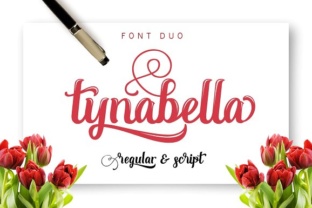
Tynabella is a modern calligraphy typeface designed to replicate the look of hand-lettered script. Unlike many script fonts that offer only a single character set, Tynabella includes multiple alternates and swashes for many letters, particularly lowercase characters and terminal forms. This means you can choose from several variations of the same letter, giving text a more organic, hand-drawn feel rather than a mechanically uniform appearance.
The font is typically categorized as a decorative or display script, making it best suited for headlines, logos, wedding invitations, quotes, and other applications where text is relatively short and intended to stand out. Its stroke contrast is moderate, with a relaxed, flowing style that avoids the rigid formalism of traditional copperplate scripts while still maintaining legibility at moderate sizes.
Who Might Be Interested in Tynabella?
If you are researching Tynabella, you likely fall into one of several groups. You might be a graphic designer looking for a versatile script for client branding projects. You could be a hobbyist or small business owner designing your own invitations, social media graphics, or product labels. Alternatively, you may be comparing script fonts for a specific publication or digital product, such as a wedding website or an e-book cover.
In each case, your primary concern is probably finding a font that offers enough character variation to avoid looking repetitive, while still being easy to work with across different software and output formats. Tynabella addresses these concerns directly through its alternate glyph system, but as with any font, there are limitations worth understanding.
The Core Benefit: Alternates and Swashes
The standout feature of Tynabella is its inclusion of stylistic alternates and swashes. In practical terms, this means you have access to multiple versions of the same letter, along with decorative flourishes that can extend from initial or terminal letters. For designers, this is a significant advantage over basic script fonts that force you to repeat the exact same letterforms, which can quickly make text look artificial.
Using alternates, you can customize the appearance of each word or phrase. For example, if the word "welcome" appears multiple times in a design, you can select different forms of "w," "l," or "e" to maintain a hand-lettered quality. Swashes allow you to add flourishes to the beginning or end of words, which can be especially effective for titles or monograms.
However, it is important to note that accessing these alternates depends on your software. Applications like Adobe Illustrator, InDesign, or Affinity Publisher support OpenType features, allowing you to easily select alternates from a glyph panel or through contextual alternates. If you are using simpler software—such as basic word processors or online design tools that lack OpenType support—you may not be able to access the full range of alternates. This is a practical limitation to evaluate before purchasing.
Tradeoffs and Considerations
No font is perfect for every situation, and Tynabella has several tradeoffs that warrant careful consideration.
- Legibility at small sizes: Like most decorative scripts, Tynabella is not designed for body text. At smaller sizes, the fine strokes and swashes can become muddied, especially in print or on low-resolution screens. For long paragraphs or small captions, a simpler, more legible script or serif font would be a better choice.
- Software compatibility: As mentioned, the alternates and swashes require OpenType-savvy software. If your workflow relies on tools like Canva (free tier), Google Docs, or other limited platforms, you may only get the standard character set, which reduces the font's value proposition.
- Kerning and spacing: Some users have noted that certain letter combinations in Tynabella may require manual kerning adjustments, particularly when using swashes that extend into the space of adjacent letters. This is common among decorative scripts but adds time to your design process.
- Licensing: Always check the license terms. Tynabella is typically sold as a single-user license or with tiered options for commercial use. If you plan to use the font in a product for sale (e.g., templates, logos for clients), ensure the license covers that usage. Some script fonts have restrictions on embedding in digital products.
- Style limitations: The modern calligraphy aesthetic of Tynabella is versatile, but it may not suit every brand or message. Formal corporate reports, minimalist modern layouts, or highly technical documents are unlikely to benefit from its decorative nature. Similarly, cultural or regional contexts may affect how a script font is perceived—something to consider if your audience is global.
When Tynabella Is a Strong Fit
Given its characteristics, Tynabella works best in specific scenarios. If your project involves any of the following, it is likely a strong candidate:
- Wedding and event invitations: The combination of alternates and swashes gives a handcrafted feel that suits formal or semi-formal events.
- Branding for creative or lifestyle businesses: Florists, bakeries, hair salons, boutique clothing brands, and similar ventures often benefit from a friendly, elegant script.
- Social media graphics and quotes: Short, visually focused text that needs to convey warmth, elegance, or a personal touch.
- Logos and wordmarks: With careful kerning and alternate selection, Tynabella can be used to create a unique logo that does not rely on heavy customization of the typeface itself.
- Product labels and packaging: Especially for artisanal or handmade products where a human touch aligns with the brand identity.
When Alternatives May Be Worth Considering
There are also situations where another font might serve you better. If any of the following apply, it is worth exploring other script or calligraphy fonts before defaulting to Tynabella:
- You need extensive multilingual support: Tynabella may not include accented characters or non-Latin scripts to the same degree as more comprehensive fonts. Check the character map if your project requires multiple languages.
- Your project involves long text passages: Even if used sporadically, a font with simpler letterforms and better legibility at small sizes will perform better for any body text component.
- You are working with limited software: If you cannot access OpenType alternates, you are essentially paying for features you cannot use. In that case, you might find equal or better value in a script font that works fully within your software's capabilities.
- You want a highly formal or traditional script: Tynabella has a modern, relaxed feel. If you need something with strict copperplate proportions or a vintage calligraphy look, other options may be more appropriate.
- Your brand is minimalist or geometric: A decorative script may clash with a clean, modern aesthetic. In such cases, a sans-serif or simple handwritten font might align better with your visual identity.
Practical Decision-Making Insights
To determine whether Tynabella is right for your needs, consider evaluating it through the following practical steps:
- Test it in your actual software. Obtain a trial version or use a font testing tool to see how the alternates and swashes behave in the application you intend to use. Pay attention to how easily you can access alternate glyphs and whether contextual alternates work automatically.
- Print a sample at your intended size. Screen previews can be misleading. Print a few words—ideally with your actual paper stock if you are working on print—to check legibility and ink behavior.
- Compare it with 2–3 similar fonts. If you are considering Tynabella, look at other modern calligraphy fonts with alternates, such as similar offerings from the same foundry or competitors. Evaluate them side by side for vocabulary of strokes, swash styles, and overall personality.
- Consider the long-term use case. If you are building a brand, will the font still feel appropriate a year or two from now? Script fonts can sometimes feel trend-driven, so consider whether Tynabella's style aligns with your brand's lifespan.
- Assess the licensing cost relative to the scope of use. If you only need it for one project, the cost may be justified. If you are purchasing for ongoing client work, ensure the license allows for commercial use across multiple projects without additional fees.
Final Considerations
Tynabella offers a genuinely useful set of alternates and swashes that can elevate a design project when used thoughtfully. Its modern calligraphy style strikes a balance between elegance and approachability, making it suitable for a range of creative applications. At the same time, it requires software that supports OpenType features and benefits from manual kerning adjustments, which adds to the design process time.
For designers who value customization and have the necessary tools, Tynabella is a practical and effective choice. For those working with limited software or needing a font for more extensive or formal text, alternatives will likely be a better fit. By evaluating your specific project requirements—including output medium, audience expectations, and your own workflow—you can make an informed decision that balances aesthetic goals with practical realities.