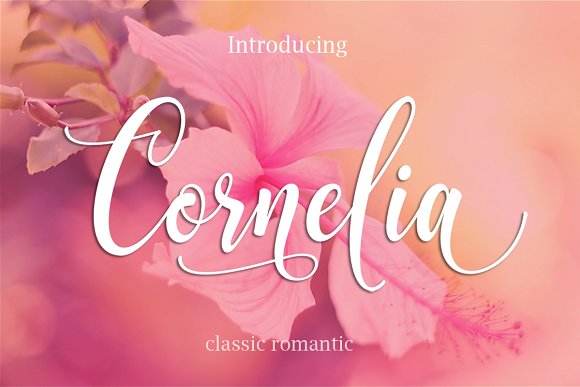
Cornelia: A Handcrafted Script with Over 370 Characters
Have you ever looked at a design project and felt like something was missing? It might have been a lack of warmth or personality. In a digital world full of perfect, identical typefaces, the human touch stands out immediately. That is where Cornelia comes in. It is a script font built from more than 370 handmade characters, designed to bring an authentic, organic feel to your work. Whether you are a blogger crafting your first logo or a business owner creating packaging, this is not just a font—it is a tool for storytelling.
The first thing you will notice about Cornelia is its flow. Each letter connects naturally, creating a rhythm that feels handwritten rather than mechanically generated. This is a huge deal for anyone trying to build a genuine connection with their audience. People subconsciously recognize authenticity, and using a font with handcrafted traits can instantly elevate a project from feeling templated to feeling unique.
Beyond the Basics – The Value of Handcrafted Characters
Most standard fonts contain around 200 glyphs. They rely on repeating exact shapes, which is great for body text like news articles, but it can feel cold or repetitive for creative projects. Cornelia offers over 370 handmade characters. This is not just a higher number—it means you get multiple versions of letters, decorative swashes, and flowing ligatures.
For someone new to typography, accessing these advanced features might sound complex, but it is quite intuitive. Many programs like Canva, Adobe Illustrator, or even basic word processors allow you to access these OpenType features. When you enable contextual alternates, the font automatically swaps out letters to create a natural, varied look. No two “l’s” or “e’s” need to look the same. This solves a common problem for designers: making a short phrase or headline look balanced and beautifully irregular.
Why does this matter? Because repetition kills elegance. When you use Cornelia for a wedding invitation or a brand logo, you want it to look like a beautiful piece of calligraphy, not a machine-typed label. The extensive character set ensures that your text has a genuine, hand-drawn feel.
Solving Real Design Problems with Cornelia
Whether you are a freelancer, a small business owner, or a hobbyist, standing out online is a constant struggle. Visual identity is the first point of contact. A generic font says "I am just like everyone else." A distinctive script font like Cornelia says "I took the time to make this beautiful."
Consider the needs of a blogger or marketer. You need compelling visuals for social media. A quote set in Cornelia on an Instagram story or a Pinterest pin has a much higher chance of stopping a user’s scroll. It adds an artistic, premium feel without requiring advanced Photoshop skills. You simply type, adjust the size, and let the font’s natural elegance do the work.
For entrepreneurs and small business owners such as bakeries, boutiques, or wellness brands, packaging and branding are everything. Cornelia works wonderfully on product labels or website headers. A coffee bag with a script logo feels artisanal. A skincare brand using Cornelia suggests natural ingredients and careful craftsmanship. It helps bridge the gap between a standard product and a premium experience.
Educators and creators can use it for course materials, presentation titles, or YouTube thumbnails. It adds a dash of personality that helps information feel less sterile and more engaging.
Creative Projects Where Cornelia Shines
Let us look at specific, tangible uses. If you are planning a wedding, creating a brand identity, or just designing something for the home, Cornelia has a place.
- Event Stationery: Save-the-dates, invitations, and thank-you cards. The swashes allow you to create beautiful, flowing heads of tables or monograms.
- Branding Logos: Perfect for elegant or vintage-inspired brands. Use it for the main wordmark and pair it with a clean sans-serif for your tagline.
- Social Media Graphics: Headlines for YouTube videos, Instagram carousels, or TikTok cover pages. The high contrast of the script ensures it reads well on mobile screens.
- Product Packaging: From candle labels to organic soap boxes, it adds a tactile, premium look.
- Website Design: Use it for main headings to create a strong visual anchor. Remember to use a standard web-safe font for the body text so readability remains perfect.
Important Considerations When Using Script Fonts
As wonderful as Cornelia is, knowing how to use it properly ensures the best result. Here are a few observations for both beginners and pros.
Readability is key. A script font like this is designed for impact. It works best in titles, short paragraphs, or single words. If you try to write a long paragraph in a dense script, it becomes difficult for the eye to follow. Pair it with a simple serif or a neutral sans-serif font for the body copy. This creates contrast and makes your design look intentional and professional.
Accessing the 370+ Characters. To get the full value of Cornelia, you will want to access the alternate glyphs and swashes. Most design software has an OpenType panel. If you are using a program that does not support OpenType features, you can often copy and paste characters using a character map. Do not be afraid to experiment—swapping an "a" for a stylistic alternate can completely change the aesthetic of a word.
Licensing. If you are using Cornelia for a commercial project, such as a company logo or product packaging, be sure to check the specific license agreement you purchased. This is standard practice for all premium typefaces. Using it for a personal project usually has no restrictions, but business use often requires a commercial license. Respecting this supports the designers who create these beautiful tools.
Pairing with Other Fonts. Because Cornelia has a strong, flowing personality, you want a supporting font that does not compete. Look for simple, clean typefaces. A geometric sans-serif or a classic serif often works beautifully. The rule is: let Cornelia be the star, and let your body font be the reliable supporting actor.
Getting Started with Your First Design
If you are a complete beginner, start small. Open your favorite design tool. Type a single word, like your name or a brand name. Then, play with the font size and spacing. Try tracking out the letters slightly to give it an airy, elegant feel.
Then, look for the alternates or OpenType settings. Select different characters and see how they change the word. You might find a swash for the capital letter that ends in a beautiful loop. This experimentation is where the magic happens. You do not need to be a professional designer to create something that looks handcrafted and premium.
Ultimately, Cornelia is about bringing a human element back to digital design. It acknowledges that people connect with other people, not with machines. By choosing a handcrafted font, you are adding a layer of care and intention to your work. Whether it is a logo for your startup, an invitation for a celebration, or a graphic for your social media feed, Cornelia provides the tools to make it memorable.
So take your time. Browse through the characters, try different combinations, and let the natural flow of the script guide your design. The result will speak for itself.