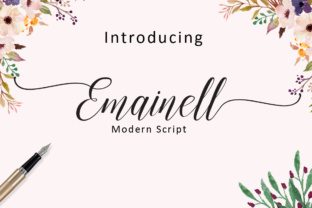
Emainell: A Handwritten Font with Classical Roots and Practical Versatility
If you have spent any time browsing font libraries, you have likely noticed that handwritten typefaces tend to fall into two camps: either they look charming but fall apart under scrutiny, or they appear polished but lose any sense of human warmth. Emainell sits in a different category. It is a handwritten font that draws from classical lettering traditions, but it also includes over 450 glyphs and 278 alternate characters. That combination of heritage and flexibility makes it appealing for anyone who wants a natural, expressive look without sacrificing control.
Still, having access to that many alternates and glyphs can lead to decisions that undermine the final result. Many people download a font like this, start typing, and never realize what they are missing—or, just as often, they go too far in the other direction and overload their work. Let us walk through the common pitfalls, the overlooked details, and the practical steps that will help you use Emainell in a way that actually improves your projects.
What Emainell Actually Offers
At its core, Emainell is a handwritten font rooted in classical proportions. The letterforms are not arbitrarily sloppy or overly stylized. They carry a sense of historical weight, yet the extensive alternate set allows you to tailor the appearance. You can choose between multiple versions of the same letter, adjust swashes, and fine-tune the rhythm of the text. This is not a font where you simply type and walk away. It rewards attention.
People often assume that a font with many alternates is automatically better. That is not always true. What matters is whether those alternates serve a purpose. In Emainell, the alternates allow you to avoid repeated letter shapes, create natural variations in spacing, and add flourishes where appropriate. The key word is appropriate.
Mistake One: Treating All Alternates as Equally Useful
When you open a font with 278 alternates, it is tempting to use a different version of every letter just because you can. This leads to text that feels chaotic rather than organic. The human eye expects some consistency in handwriting. Even the most expressive lettering has a baseline rhythm. If every a looks completely different, the reader senses that something is off.
Better approach: Start with the default letterforms and only swap in alternates when you notice an unintended repetition or when you want to emphasize a specific word or initial. For longer passages, use alternates sparingly to maintain flow. A good rule is to limit alternates to no more than one in every eight to ten characters, unless you are deliberately going for a highly decorative effect.
- Test your text at the size it will actually be viewed.
- Print a sample or view it on a screen at 100% zoom.
- Ask yourself whether the alternates add clarity or distraction.
Mistake Two: Ignoring Glyph Coverage for Your Specific Needs
Emainell includes over 450 glyphs, which covers a wide range of languages and typographic needs. But people sometimes assume that because the number is high, every character they need is present. That is not always the case with handwritten fonts. Certain diacritical marks, currency symbols, or specialized punctuation may be missing or styled differently than expected.
If you are working on a multilingual project, a product label, or any document that requires special characters, check the glyph set before you commit. This saves you from discovering mid-project that you need to switch fonts or manually construct a character.
- Open the font in a glyph viewer or your design software's character map.
- Scroll through the full set to confirm the characters you rely on.
- Pay special attention to accented letters, ligatures, and numerals.
This step takes five minutes and prevents hours of frustration. It is one of those details that separates prepared users from those who end up making compromises.
Mistake Three: Using Emainell Where Readability Must Be Instant
Handwritten fonts have a natural charm, but they also have limits. Emainell is more legible than many handwritten options because of its classical roots, but it is still a script with variation in stroke width and letter slant. Using it for body text in a long article, a data-heavy report, or a small-format label can reduce comprehension significantly.
Where it shines: Headlines, short quotes, social media graphics, product packaging, invitations, branding elements, and any context where the human touch adds value. For longer reading, pair it with a clean sans-serif or serif font. Let Emainell carry the emotional weight, and let a more neutral font handle the information delivery.
Entrepreneurs and small business owners often try to use one font for everything to keep branding simple. That is understandable, but it creates a single point of failure. Instead, treat Emainell as your accent voice. Use it to draw attention, not to deliver the full message.
Mistake Four: Overlooking Spacing and Kerning Adjustments
Every handwritten font has spacing quirks. Even with well-crafted alternates, the rhythm of the text depends on the specific combination of letters you choose. Emainell includes multiple alternate characters specifically to help you adjust spacing, but you still need to be willing to tweak kerning manually.
Do not rely solely on the auto-kerning in your software. After you apply the font, zoom in on problem pairs—letters like AV, To, Wa, or any combination where a diagonal stroke meets a vertical one. Adjust until the visual space feels even. This is especially important when you use swash variants or extended alternates.
Practical tip: If you are designing a logo or a short headline, place each word in its own text box. This gives you full control over spacing without affecting other parts of the layout. For longer text, use the tracking and kerning controls in your software, and check the output at the intended size.
Mistake Five: Choosing Emainell Without Considering the Project's Context
Not every project benefits from a handwritten font, no matter how good it looks. Emainell suits projects that aim to feel personal, historical, warm, or artisanal. It works well for a bakery label, a wedding invitation, a creative agency's website, or a personal blog header. It feels out of place in a corporate compliance document, a technical manual, or a financial newsletter.
That might sound obvious, but I have seen people fall in love with a font and force it into contexts where it actively undermines trust. The reader perceives a mismatch. If your audience expects precision and authority, a handwritten font can feel casual or even careless.
- Ask yourself: What tone does this project need?
- Does the font support that tone or fight it?
- Would a different font serve the message better?
There is no rule that says you cannot use Emainell for a professional purpose. Many creative professionals use it for brand identities and marketing materials. The difference is that they choose the font deliberately, not by default.
Mistake Six: Forgetting About Licensing and Usage Rights
This is the mistake that costs the most. Emainell, like any quality font, comes with specific licensing terms. If you download it from a legitimate source, you will see options for personal use, commercial use, or extended licenses. Do not assume that a single purchase covers every scenario.
Freelancers, small business owners, and marketers are especially vulnerable here because they often work across multiple projects, clients, and platforms. A font license that covers a logo may not cover web embedding, app use, or merchandise. Read the terms before you buy, and keep a record of your licenses.
If you work with contractors or designers, clarify who is responsible for licensing. It is common for a project to stall because the font license does not cover the intended use. Avoid that by checking early.
What to Check Before You Commit to Emainell
Before you purchase or download Emainell, take a moment to confirm a few practical points. These steps will save you time and money, and they will help you use the font with confidence.
- Test it in your actual workflow. Download the trial version if available, or use a font testing app. Type your own content, not just the sample text provided.
- Check the alternate character implementation. Some fonts require OpenType-aware software to access alternates. Make sure your tools support this. Most modern design applications do, but not all.
- Review the available formats. Confirm that the font file works on your operating system and in your preferred software. OTF and TTF are common, but web font formats may be separate.
- Evaluate the pairings. Think about what fonts you will use alongside Emainell. A clean sans-serif like Lato or a classic serif like Playfair Display often works well. Test the combination before you finalize it.
Better Habits for Using Emainell in Real Projects
Once you have avoided the common mistakes, you can focus on getting the most out of the font. Here are a few approaches that consistently produce strong results.
Use alternates to solve problems, not to decorate. When you see a repeated letter in a short headline, swap in an alternate to break the pattern. When a descender clashes with an ascender on the line below, choose a variant that avoids the collision. Each alternate should have a reason.
Embrace white space. Handwritten text needs room to breathe. Tight letter spacing and cramped layouts make even the best alternates look cluttered. Give Emainell generous margins, adequate line height, and space around the text block.
Create consistency through contrast. If you use Emainell for a headline, pair it with a font that is visibly different—neutral, geometric, and restrained. That contrast makes the handwritten quality stand out more than any alternate ever could.
Test on real devices. What looks good on your design monitor may look different on a phone screen or a printed menu. Export a sample and view it in context. Adjust alternates and spacing based on that real-world feedback.
The Value of a Handwritten Font That Gives You Control
Emainell offers something that many handwritten fonts do not: a genuine range of choices that actually affect the outcome. With 278 alternates and over 450 glyphs, you have the raw material to create text that feels personal without being sloppy. But that potential is only realized when you use those features with intention.
For beginners, the learning curve is modest. You do not need to be a typography expert to benefit from alternates. Start small. Use one or two alternates per project. As you grow comfortable, you will develop an instinct for when a letter needs variation and when it is better left alone.
For professionals, Emainell provides enough depth to handle client work that demands a handcrafted feel. The classical root means it does not look trendy or disposable. It holds up across different media and different messages. That is rare in the handwritten font category.
Whether you are branding a new business, designing a wedding suite, or creating content for social media, the font you choose shapes the reader's perception. Emainell, used well, communicates warmth, care, and a sense of history. That is worth protecting by avoiding the common mistakes outlined here.
Take the time to explore the glyph set, adjust the spacing, and match the font to the right context. The result will be work that looks intentional, not accidental. And that is the whole point of choosing a font like this in the first place.