Chamelia Handwritten Font: A Practical Guide
Handwritten fonts fill a unique space in design. They bring warmth, personality, and a human touch to projects that polished typefaces sometimes lack. Chamelia, created by Area Type, stands out in this category for a few thoughtful reasons. Whether you are designing a logo, crafting social media posts, or building a personal brand, this font offers something worth considering. Let us explore what makes Chamelia different, how it can serve your projects, and what to keep in mind before using it.
What Is Chamelia and Why Does It Matter?
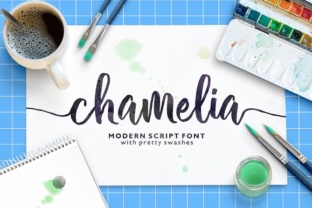
Chamelia is a handwritten font developed by the foundry Area Type. At first glance, it looks like natural, flowing handwriting — not too rigid, not too messy. It strikes a balance between legibility and character. Many handwritten fonts lean heavily into one extreme: either they are so neat they look like a machine wrote them, or so loose they become hard to read. Chamelia avoids both traps.
The name itself hints at adaptability. Like a chameleon, this font can blend into different contexts without losing its identity. It works equally well on a casual poster, a boutique website, or a product label. This versatility is part of its appeal for creators who need one typeface that can do multiple jobs across print and digital media.
For beginners, this means fewer decisions. Instead of hunting for a separate font for every new project, you can return to Chamelia as a reliable, friendly choice. For professionals, it means efficiency. When you know how a font behaves across sizes and backgrounds, you save time and avoid surprises.
Who Benefits Most from Using Chamelia?
This font connects with a wide group of people. Here are some of the users who find real value in it:
- Freelancers and solopreneurs who want a cohesive brand without hiring a designer. Chamelia adds a personal feel to business cards, invoices, and pitch decks.
- Bloggers and content creators who need eye-catching titles, quote graphics, and headers that feel approachable rather than corporate.
- Small business owners running cafes, boutiques, or creative services. The font can appear on menus, signage, packaging, and social media.
- Hobbyists and part-time makers who sell on Etsy, print greeting cards, or design invitations. Chamelia helps handmade projects look intentional.
- Educators and workshop leaders who create handouts, slide decks, or classroom posters where a warm tone matters.
If any of these describe you, Chamelia can support goals like building trust with an audience, saving time on font selection, or simply making your materials more memorable.
Practical Ways to Use Chamelia in Real Projects
Knowing what a font looks like is one thing. Knowing where to place it is another. Here are concrete examples of Chamelia in action across different contexts.
Branding and Identity Work
A local coffee shop wanted its takeout cups to stand out without looking loud. Using Chamelia for the shop name and a short tagline created a handwritten, welcoming feel. Customers mentioned the cups felt personal, as if each one had been written by hand. For a brand, that kind of reaction builds connection. If you are starting a small business, try Chamelia for your logo or hero text on your website. Pair it with a clean sans-serif for body copy, and you have a simple, professional identity system.
Social Media and Digital Content
Platforms like Instagram and Pinterest reward content that stops the scroll. Handwritten fonts often perform well here because they feel human. Chamelia works for quote posts, announcement graphics, and story overlays. Because it remains readable at smaller sizes, you can use it on mobile screens without losing impact. One blogger used Chamelia for her weekly newsletter header. Readers started commenting that the emails felt more like a letter from a friend than a broadcast.
Print Materials and Small Products
If you design your own stationery, Chamelia brings a consistent handcrafted look across items. Thank-you cards, product tags, and stickers all gain a cohesive identity when the same font appears throughout. An Etsy seller making art prints used Chamelia for the title of each piece. Instead of a generic script, the font gave the prints a collected, curated feel. Buyers appreciated the detail.
Educational and Informational Handouts
Teachers and trainers often want materials that feel warm but still professional. Chamelia works well for worksheet titles, motivational posters, and workshop certificates. One educator used it for a class newsletter sent home to parents. The font softened the tone of important announcements without making them look childish.
Characteristics That Make Chamelia Stand Out
Several traits define this font beyond its basic handwritten look.
- Natural variation in letterforms. No two characters feel identical. This creates a rhythm that mimics actual handwriting, avoiding the mechanical repetition of some script fonts.
- Good legibility even at small sizes. Many handwritten fonts blur or lose shape at 12 or 14 pixels. Chamelia keeps its clarity, making it usable for body text in certain contexts.
- A moderate x-height. This means lowercase letters are tall enough to read easily but not so large that they crowd ascenders and descenders. The result is a balanced line of text.
- Support for multiple languages. If your audience spans different regions, Chamelia covers a broad character set. This is especially useful for global brands or educators working with diverse groups.
What to Consider Before Choosing Chamelia
No font works perfectly in every situation. Knowing the limitations helps you avoid common mistakes.
Context matters. Chamelia is informal. If you are designing for a law firm or a financial institution, it will feel out of place. Save it for projects where warmth and personality are assets, not liabilities.
Pairing wisely. Because Chamelia has a strong voice, it needs a calm partner. A simple sans-serif like Open Sans or Lato works well for supporting text. Avoid pairing it with another busy or script-like font, or your design will feel cluttered.
Licensing and usage rights. Before buying, check the license terms. Some fonts from Area Type have restrictions on commercial use or require an extended license for merchandise. Read the fine print so you do not run into legal issues later.
Testing before committing. Download the free trial version if available. Test Chamelia in your main applications: a word processor, a design tool like Canva or Adobe Illustrator, and a web mockup. See how it renders at the sizes you plan to use. Testing early saves frustration later.
File format support. Chamelia typically comes as OTF and TTF files. These work in most modern software. But if you are working in a niche tool or an older program, verify compatibility first.
Getting Started with Chamelia
If you are new to working with handwritten fonts, here is a simple path forward.
- Decide where you will use the font most. Pick one primary context: a website header, a logo, or a print project. Focusing on one use case first makes the learning curve smaller.
- Pair it with a neutral background. White, off-white, or light pastel backgrounds allow the font to shine without competition.
- Keep your message short. Chamelia works best for headlines, names, and short phrases. Long blocks of text can become tiring to read, even when the font is legible.
- Collect inspiration. Look at how other creators combine handwritten fonts with images, icons, or textures. Notice what feels balanced and what feels busy. Over time, you will develop an instinct for what fits.
Chamelia from Area Type offers a thoughtful, flexible option for anyone who wants their words to feel human. Whether you are a blogger wanting warmer engagement, a business owner building a brand from scratch, or a hobbyist making something for fun, this font gives you a tool that adapts. Start small, test often, and let the font work for you in ways that feel natural.